
FBA Grade & Resell: What Real Data Shows
A customer sent me their Grade & Resell data a week ago. They had enabled the program 6 months ago. They had never looked closely at the numbers.
Their question was simple: "Is this actually working?"
I ran the analysis. The answer was: mostly yes, but not for the reason they expected, and not for all of their SKUs.
Here is that analysis. If you have Grade & Resell enabled in your account, and many sellers do without fully knowing what it does, this is what you actually need to understand about it.
"Without data, you're just another person with an opinion." — W. Edwards Deming
📦 What Grade & Resell Is
Grade & Resell is one of three recovery options Amazon offers for unfulfillable FBA inventory. You find it in Settings > FBA > Automated Unfulfillable Settings. The other two options on that same page are Refurbishment and Liquidation.
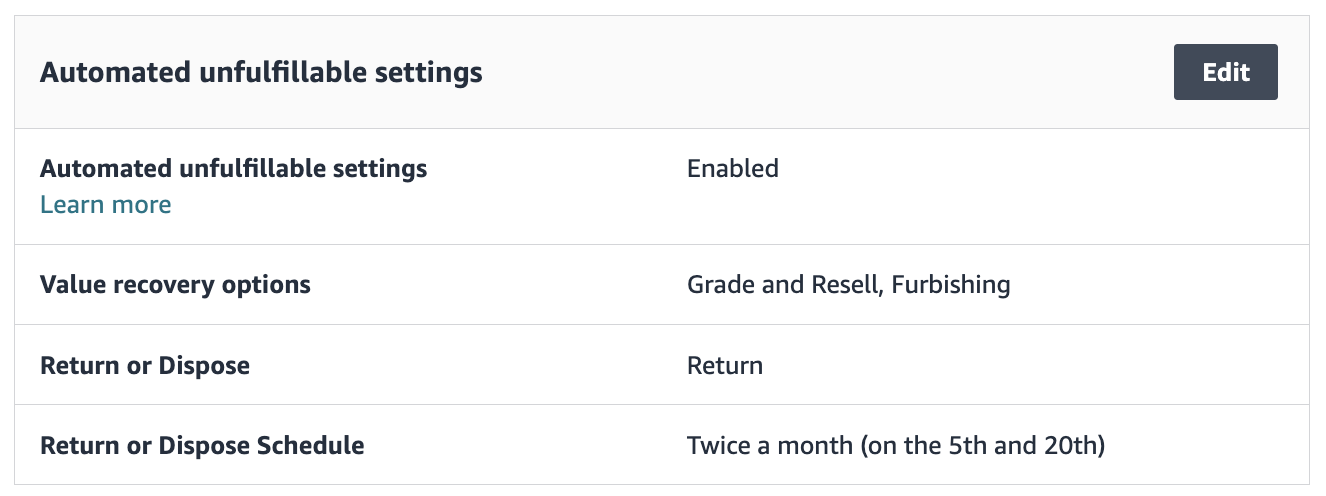
The program is designed to handle a specific situation: returned items that arrived in a condition where Amazon cannot re-list them as new, but that still have enough physical integrity to be sold as used.
Here is the sequence:
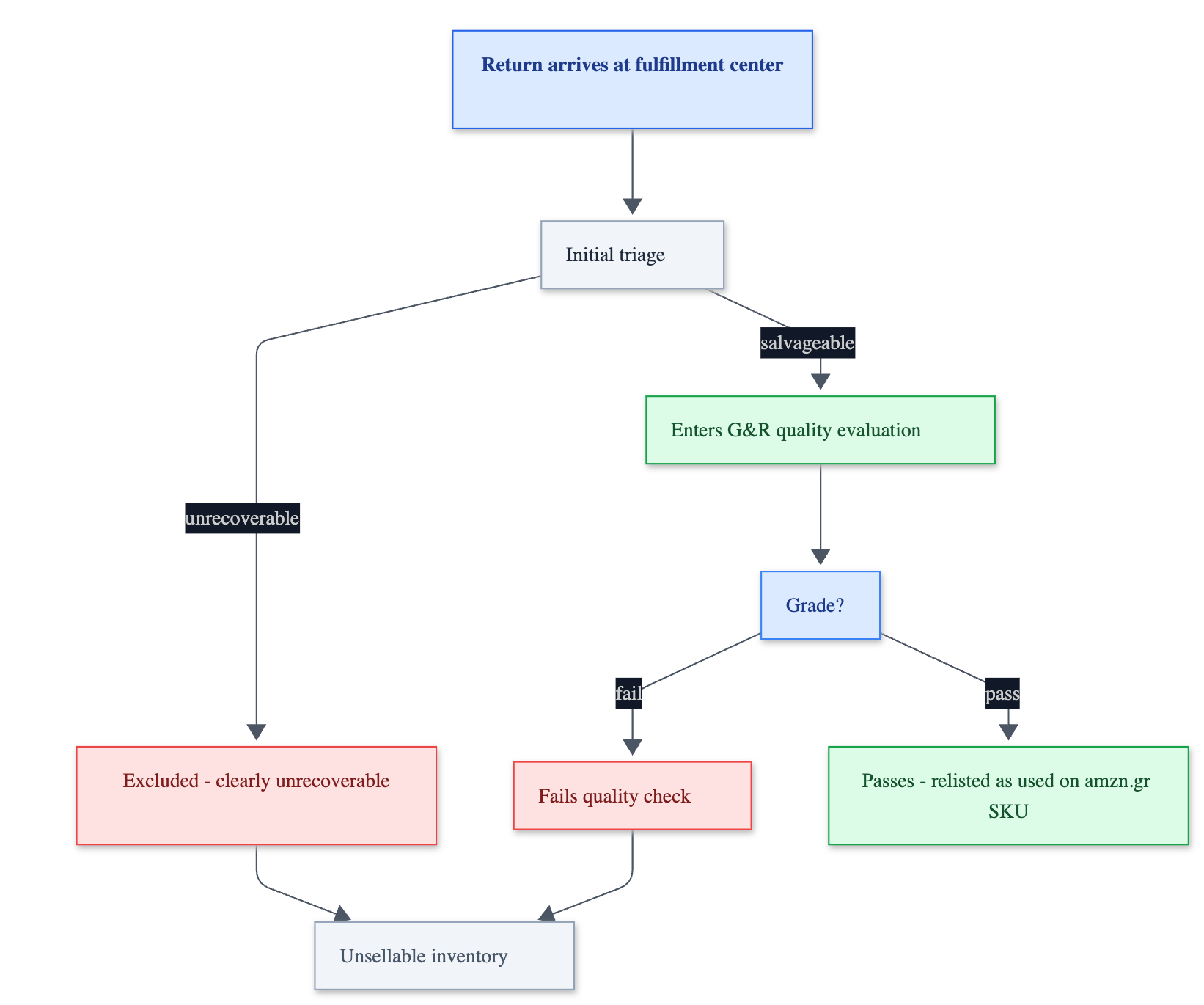
When a return lands at a fulfillment center and is classified as unsellable, Amazon runs an initial triage. Items that appear clearly destroyed or beyond recovery are excluded immediately. Items that seem physically salvageable are passed to the Grade & Resell evaluation.
That evaluation assigns the item a quality grade, ranging from the highest condition tier down to the lowest. Amazon uses four grades to represent different levels of used condition:
- Used: Like New
- Used: Very Good
- Used: Good
- Used: Acceptable
Two outcomes are possible from here. The item passes and is relisted as used inventory under a new SKU, or it fails and joins the unsellable pile alongside the items excluded at triage.
One thing to be aware of operationally: every unit that passes through Grade & Resell gets a new SKU starting with amzn.gr. If you ever see those prefixes in your inventory reports or sales history, that is Grade & Resell activity. It is useful to know, because it adds a layer of SKU complexity to your reports that you may not have accounted for.
🔢 What the Numbers Actually Show
Here is the breakdown from the customer's account, covering roughly five months of activity.
163 units entered the Grade & Resell program.
- 102 units (62%) were successfully graded and re-listed as used inventory
- 61 units (38%) did not meet the quality threshold and remained unsellable
One detail stood out in the grade distribution: 87% of the successfully recovered units were assigned "Used: Like New", the highest quality tier. The remaining 13% were spread across the lower three grades.
My read: Amazon is not comfortable re-listing items at lower quality levels. If a unit does not clear the top tier, it probably does not make it through the program at all.
A 62% pass rate sounds like a solid result. And it is, for the units that made it that far.
But the 62% figure only tells part of the story. To understand the program's real contribution, you need to look at the full universe of unsellable inventory from the same period.
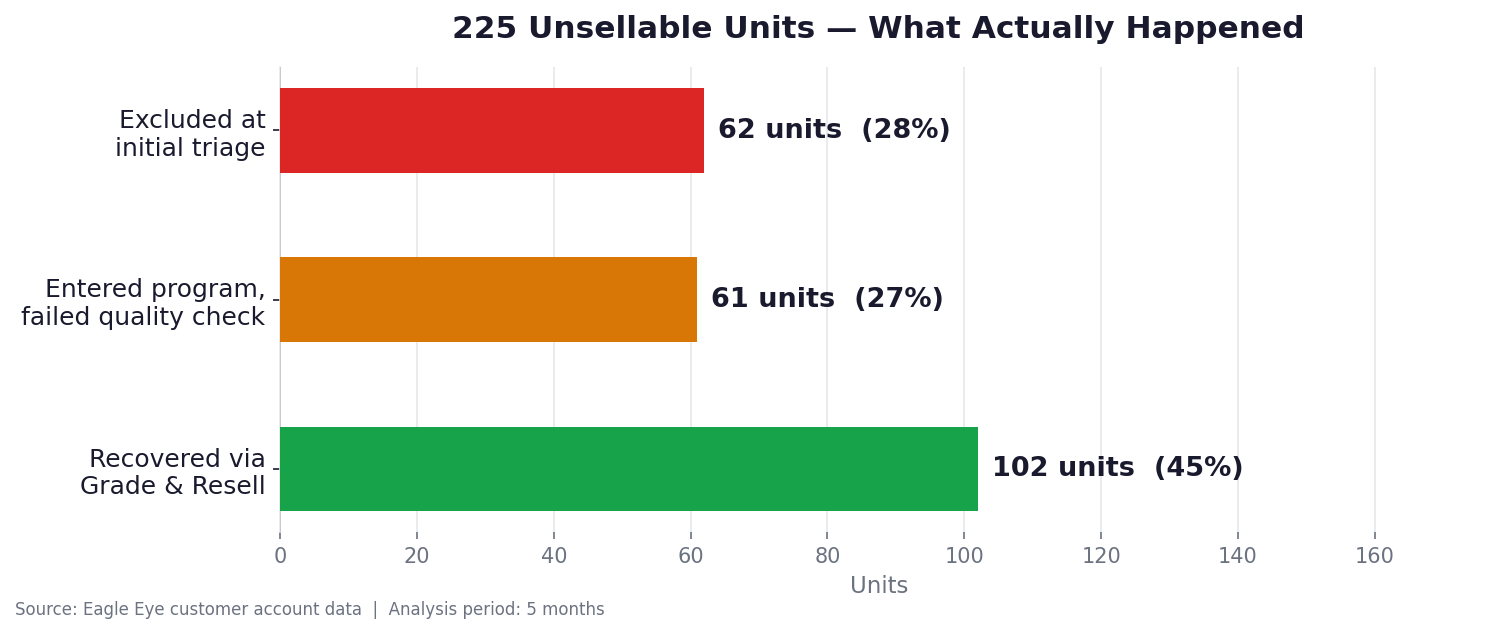
During those five months, 225 units were classified as unsellable across all causes.
Here is how those 225 units were distributed:
- 62 units (28%) never entered Grade & Resell. They were excluded at the initial triage, likely because Amazon's first visual assessment determined they were clearly unrecoverable.
- 61 units (27%) entered the program but failed the quality assessment.
- 102 units (45%) were successfully graded and relisted as usable, sellable used inventory.
The actual Return Recovery Rate, against the full unsellable base, is 45%, not 62%. The difference is not trivial. The 62% number is accurate for what it measures, but it only measures the Grade & Resell effectiveness. If you are evaluating whether Grade & Resell is worth keeping active, 45% is the number that matters.
If you are not yet tracking Return Recovery Rate as a standalone KPI, I covered exactly that in a previous article: 3 FBA Return Recovery Metrics Most Sellers Ignore. Grade & Resell directly improves this metric, which is why it is worth measuring before and after enabling the program.
Neither number is wrong. They answer different questions. Just be clear on which one you are looking at.
💶 The Economics
Recovery rate measures units. Revenue recovery depends on something else: the resell price, which is set as a percentage of your original selling price depending on the grade.
The program also has a fee, charged only on successful recoveries. You will not see it in the standard Seller Central interface. To find it, go to Payments, then Transactions, and download the report as a CSV. Look for "grade and resell fees" in the Transaction Type column.
To make a proper financial assessment, here are the questions that matter:
- What is the resell price for this unit after grading?
- What is the Grade & Resell fee?
- What would you recover if you requested a removal instead, reprocessed the item yourself, and either restocked it or sold it through another channel?
- What are your removal and handling costs on that path?
✅ When It Makes Sense for Your Products
The program is not a universal win. Based on how the economics work, it performs best under two conditions.
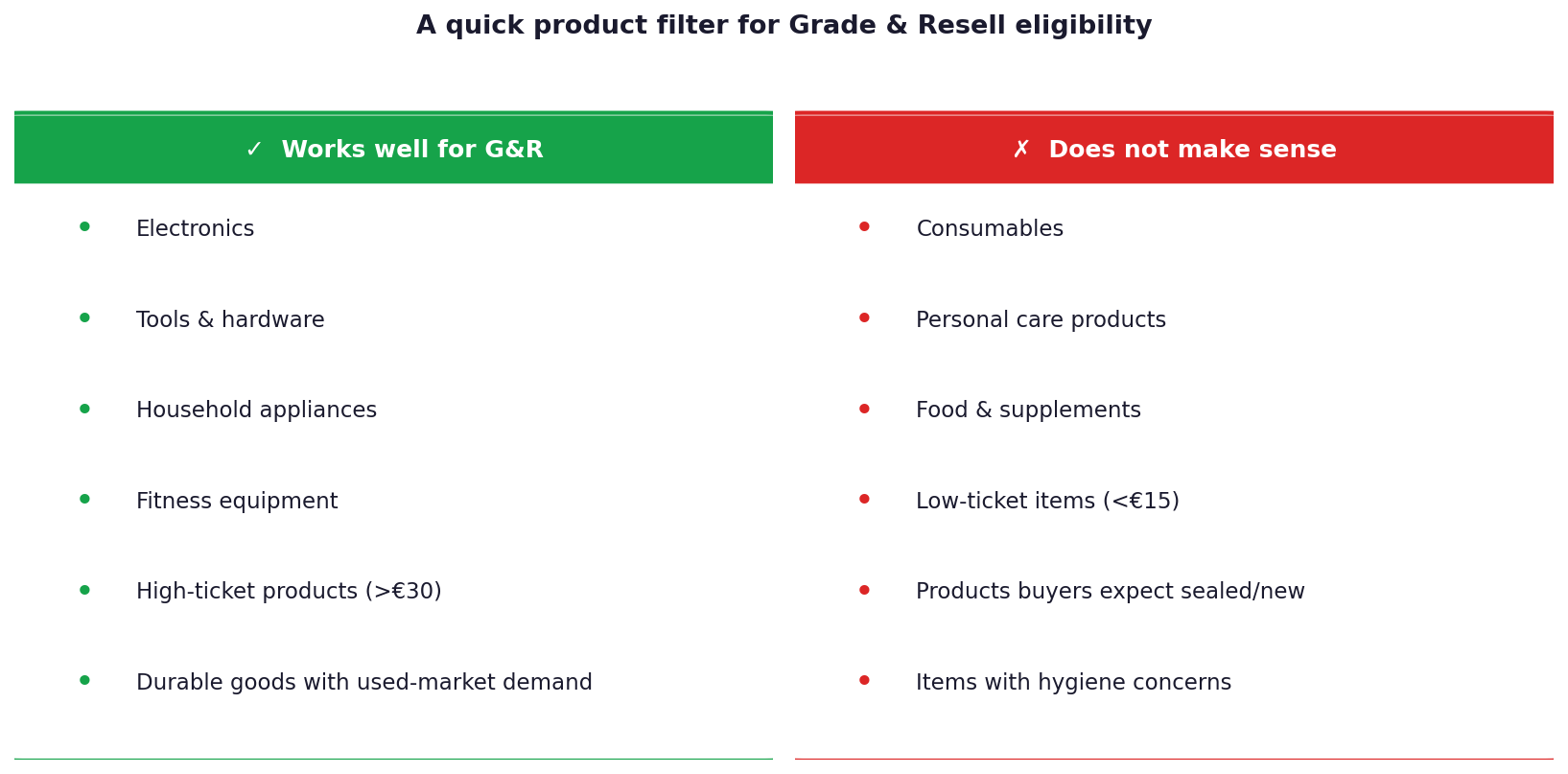
Higher-priced products. When your unit sells for more, the fixed program fee (it goes by size) represents a smaller percentage of the recovery value. For low-ticket items, that fee often consumes most of what the program generates.
Products with real demand in used condition. Think electronics, household appliances, tools, fitness equipment, anything where buyers actively search for used alternatives to save money. You would not enroll a toothbrush in Grade & Resell.
A useful mental filter: if you would buy a used version of your own product to save money, your customers probably would too. If the answer is no, Grade & Resell will struggle to generate meaningful revenue on those SKUs.
🔁 What Grade & Resell Does to Your Return Recovery Rate
For sellers tracking return recovery rate, there is a direct connection worth naming.
Grade & Resell actively improves your FBA Return Recovery Rate. Every unit successfully regraded and relisted as used is a unit that moved from the unsellable column back into sellable inventory. That shows up as improved recovery at the FBA level.
Enabling it does not solve everything, but its contribution is measurable and direct.
The formula for recovery rate should include Grade & Resell units alongside standard returns to new condition:

📊 How to Actually Check Your Own Numbers
To run this analysis for your own account:
- Enable the program (if not already active): Settings > FBA > Unfulfillable Inventory Settings
- Pull the Grade and Resell report: FBA reports section in Seller Central, downloadable as CSV
- Find your fees: Payments > Transactions > download CSV, filter Transaction Type for "grade and resell fees"
- Compare to your removal data: what would the same units have recovered via the removal route?
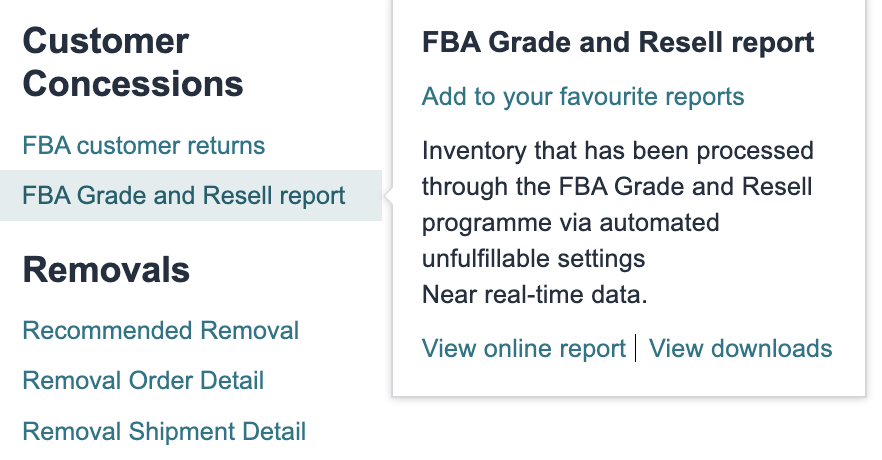
Give it at least 60 to 90 days of data before drawing conclusions.
One thing Grade & Resell does not do: recover money from Amazon's own errors, return fraud, or removal discrepancies. Those losses sit in a different part of your account, and for most FBA sellers they are larger than what any program inside Amazon's warehouse system recovers. Most sellers have never quantified them.
If you want to know what is sitting in your account right now, the Eagle Eye audit maps it in a few minutes: /return-scanner/audit