How to Recover Money from Your Returns on Amazon FBA?
As we saw in our previous article "How Do Returns Work in Amazon FBA?" for an Amazon Seller, Returns generally represent more of a problem than an opportunity.
In this article however - we would like to explain how you can get Reimbursements, and consequently cash, from your FBA Returns.
In Which Cases Can You Recover Money and Reimbursements from Your Returns?
You'll be surprised to know however that there are 2 Cases in which you can get Reimbursements from Amazon on your Returns. Precisely:
- In all those cases where your Returns have been damaged by Amazon Transport or Amazon Logistics
- In all those cases where your Returns have not been returned to FBA Logistics by the end Customer - after 30 days from the start of the Return request
In both Cases, Amazon reimburses the Seller sometimes, but not always! By Policy in fact, you as a Seller are completely responsible for recovering your money on damages done by Amazon Logistics.
How to do it? Keeping everything under control is I-M-P-O-S-S-I-B-L-E! Especially for us Sellers, overwhelmed with things to do all day.
Fortunately, Eagle Eye comes to our aid. This tool allows you to identify all the circumstances in which your returns haven't returned to Amazon Logistics and to promptly remove your damaged returns to request the related reimbursements.
Let's see both Cases in more detail.
How to Recover Reimbursements on Returns Not Returned by the End Customer
The first thing to do is identify all those ASINs that have Returns that have not been returned by the end Customer to your FBA Logistics, once the 30 days granted have passed.
Of these Returns, you need to verify those that haven't been reimbursed to you by Amazon yet!
In the Reconciliation section of the Eagle Eye Dashboard you can easily identify at a glance these Unreimbursed Returns among your Missing Units, in the main screen.
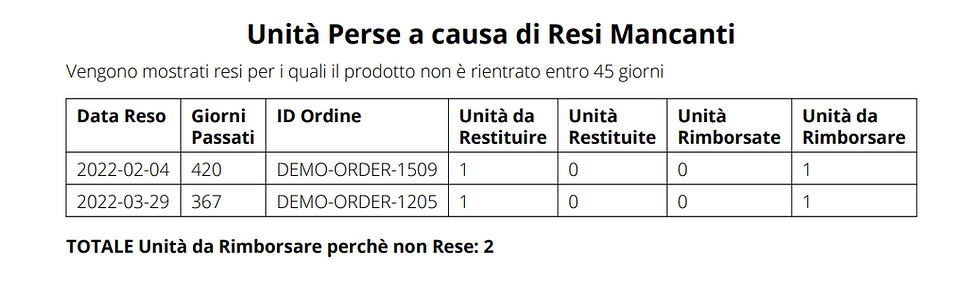
In particular, you can click on "Download Report" and view all the relevant information to bring to Amazon when opening your Case: the order numbers, the dates, the number of days passed and the amounts to request for your Reimbursements.
At this point, you just need to click on "Open Amazon Case" copying and pasting our template that you'll find inside the Software. We leave you an example below:
Hello Amazon Support,
Regarding ASIN [insert-ASIN] with FNSKU [insert-FNSKU], for order [insert-order-ID], it shows:
- [insert-number] Units not returned to FBA to be Reimbursed
- [insert-days-passed] days passed since the Return Request
as per attached report.
I await kind feedback and reimbursement for the Units to be Reimbursed. Thank you
At this point, all you have to do is wait for your Reimbursements from Amazon!
Remember to insist if you get resistance from Amazon: often Reimbursements are made after two or three responses to cases where you bring the evidence expressed above!
How to View Returns Damaged by Logistics and Remove Them to Request Your Reimbursements
All your damaged ASINs can and must be removed from Amazon Logistics so that you can request the Reimbursements you're entitled to.
The first thing to do is therefore to view where the Damaged Returns are: often in fact Amazon doesn't correctly declare all damaged products within the Seller Central Reports and there's a need to do an accurate analysis and check of where all the damaged units are hiding.
To easily view your Damaged Units to remove you can therefore go to the Distribution section of the Eagle Eye Dashboard. In particular - by selecting the "Unsellable" option in the appropriate screen - you'll be able to view all the damaged Returns to be removed, located in all European areas.
N.B. Remember that some units could be dispersed in warehouses throughout Europe, even if you haven't explicitly requested to send them outside Italy: if you don't have active tax identifications abroad you must ALWAYS remove your merchandise and bring it back to Italy!
Then opening your Amazon Case you can specify the following information to request your Reimbursements:
Hello Amazon Support,
Regarding ASIN [insert-ASIN] with FNSKU [insert-FNSKU], it shows:
- [insert-number] Unsellable Units present in Warehouse [insert-warehouse-location]
I kindly ask to REMOVE these units and send them to my Receiving address: [insert-address].
I also request the Reimbursement of these units as they are damaged by Amazon Logistics and Unsellable for the end customer.
I await kind feedback and reimbursement for the Units to be Reimbursed. Thank you
And now? All you have to do is sign up for Eagle Eye now and proceed to request your Reimbursements!