FBA Returns, Removals & Reimbursements: The R3 Cycle
Three words. Used every day. Used wrong.
Reimbursement. Return. Removal.
FBA operators flip between these three terms as if they meant the same thing. Amazon Support uses them inconsistently. Forum threads mix them.
That fuzziness feels harmless. It is not.
"The beginning of wisdom is to call things by their proper names." - Confucius
Sloppy vocabulary leads to sloppy operations. And in FBA, sloppy operations show up as loss.
These three words are not synonyms. They are three distinct events that happen in a fixed order, connected as a single process. Once you see the connection, the confusion lifts and the operational chaos becomes clarity.
I call this process the R3 Cycle.
🗺️ Let's Take a Ride, Shall We?
Picture a single unit of your product sitting in an Amazon fulfillment center.
A customer orders it. Amazon ships it. The customer opens the box, looks at the product, decides he does not want it.
Now follow that unit on its journey home.
The customer asks Amazon for his money back. Amazon decides whether the customer needs to ship the unit back or not. Let's say it does.
The unit comes back. It checks in at an Amazon fulfillment center.
Amazon evaluates it. If it is resellable, it goes back on the shelf. If it is not, it sits in Amazon's warehouse until a removal order is created.

Removal Order is created. That order is split into several Removal Shipments. The unit we are following embarks in one of these boxes. That shipment leaves Amazon's network.
It finally lands in your warehouse.
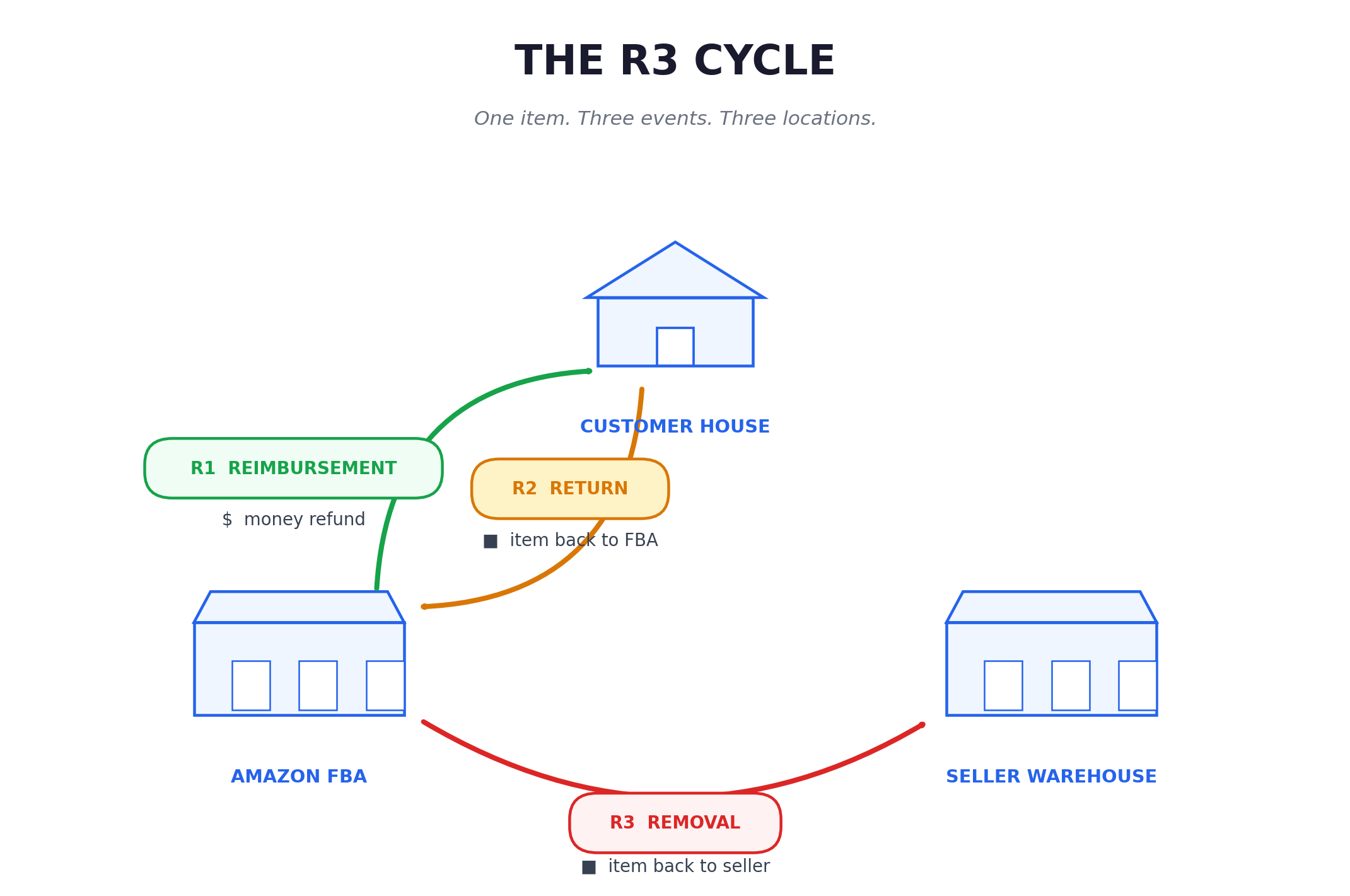
Three stops. Three named events. One continuous process.
- R1, The Reimbursement: the moment the customer asks for his money back.
- R2, The Return: the unit physically traveling from the customer's house back to Amazon
- R3, The Removal: the unit traveling from Amazon's warehouse back to yours
Each one has its own trigger, its own timeline, and its own set of things that can go wrong.
💸 R1: The Reimbursement
The first event in the cycle is not a return. It is a customer asking for his money back.
This is where most of the vocabulary confusion starts. Amazon calls it a refund in its dashboards. Sellers often call it a return in conversation. We call it customer reimbursement, because that is exactly what it is: the customer is being made whole. Money moves from your account to his.
What happens next depends on Amazon's algorithm.
If Amazon decides the customer does not need to ship the unit back, the process is called a returnless refund. The customer keeps the product. You lose the unit and the money.
If Amazon decides the customer must ship the unit back, the cycle enters its second event: the return.
The single most important thing to understand at this stage is that the customer can ask for reimbursement up to 30 days after delivery. That clock has consequences downstream. The longer the customer waits, the longer everything else is pushed back.

📦 R2: The Return
The return is the physical journey of the unit from the customer's house to an Amazon fulfillment center.
This stage has two distinct phases.
- First, the transit. The customer has up to 45 days, sometimes longer, to actually ship the unit back.
- Second, the evaluation. Once the unit arrives at the Amazon fulfillment center, Amazon checks its condition and decides whether it is sellable or unsellable. Sellable units go straight back into your active inventory. Unsellable units sit in Amazon's warehouse, marked as defective stock, waiting for the third event in the cycle.
Two outcomes. Two very different financial futures.
If the unit is sellable, the impact on you is smaller. If the unit is unsellable, you lost the sale revenue, paid the return fee and now have inventory you cannot sell, accruing storage fees.
🚚 R3: The Removal
The third event is where you can lose a lot of money, if you do not act properly.
A removal order is the instruction Amazon executes to move unsellable units out of its fulfillment network. Two paths exist.
The first is removal by disposition. Do not do this. You are basically setting fire to the capital invested in your units. If you didn't know that, you are excused. But if you already read my articles, what are you waiting for? Change this now.
The second is removal by return. Amazon ships the unit back to your own warehouse. This is the only path that makes sense and thus when we say Removal we implicitly mean by Return.
Here is what actually happens. Amazon creates the removal order. The order is split into multiple removal shipments, each departing from a different fulfillment center, each carried by a different carrier, each arriving at your warehouse at a different time. One order can become five shipments over three weeks.
Now look at the failure modes:
- A removal shipment is lost in transit and never arrives at your warehouse
- A shipment arrives but contains fewer units than Amazon declared
- A box arrives holding units that are not your product at all
- A returned unit is incomplete, missing parts, or in a state that makes it useless to you
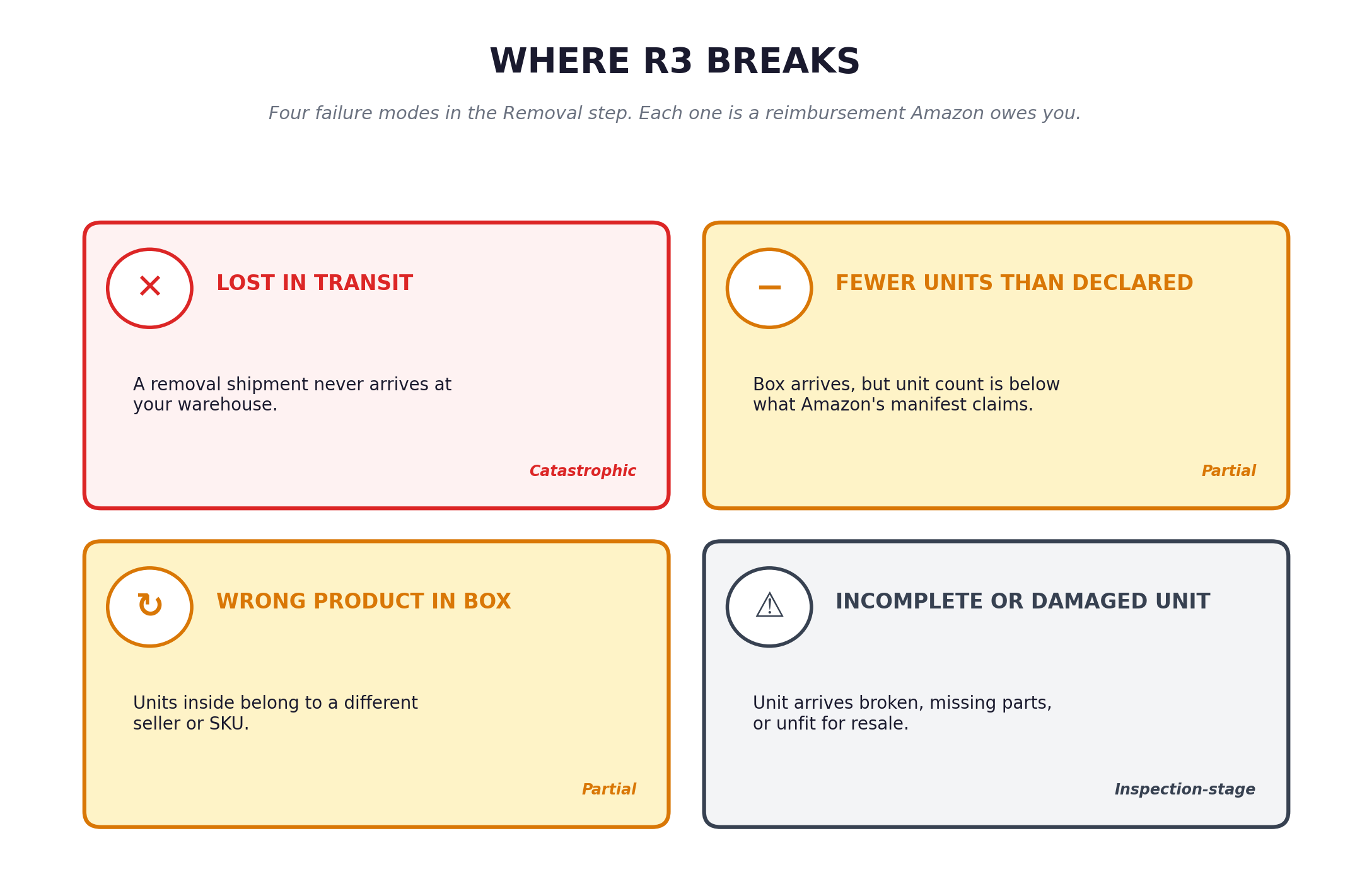 Every one of these failure modes is a reimbursement opportunity. But you cannot claim what you cannot see.
⏱️ Time Is the Multiplier
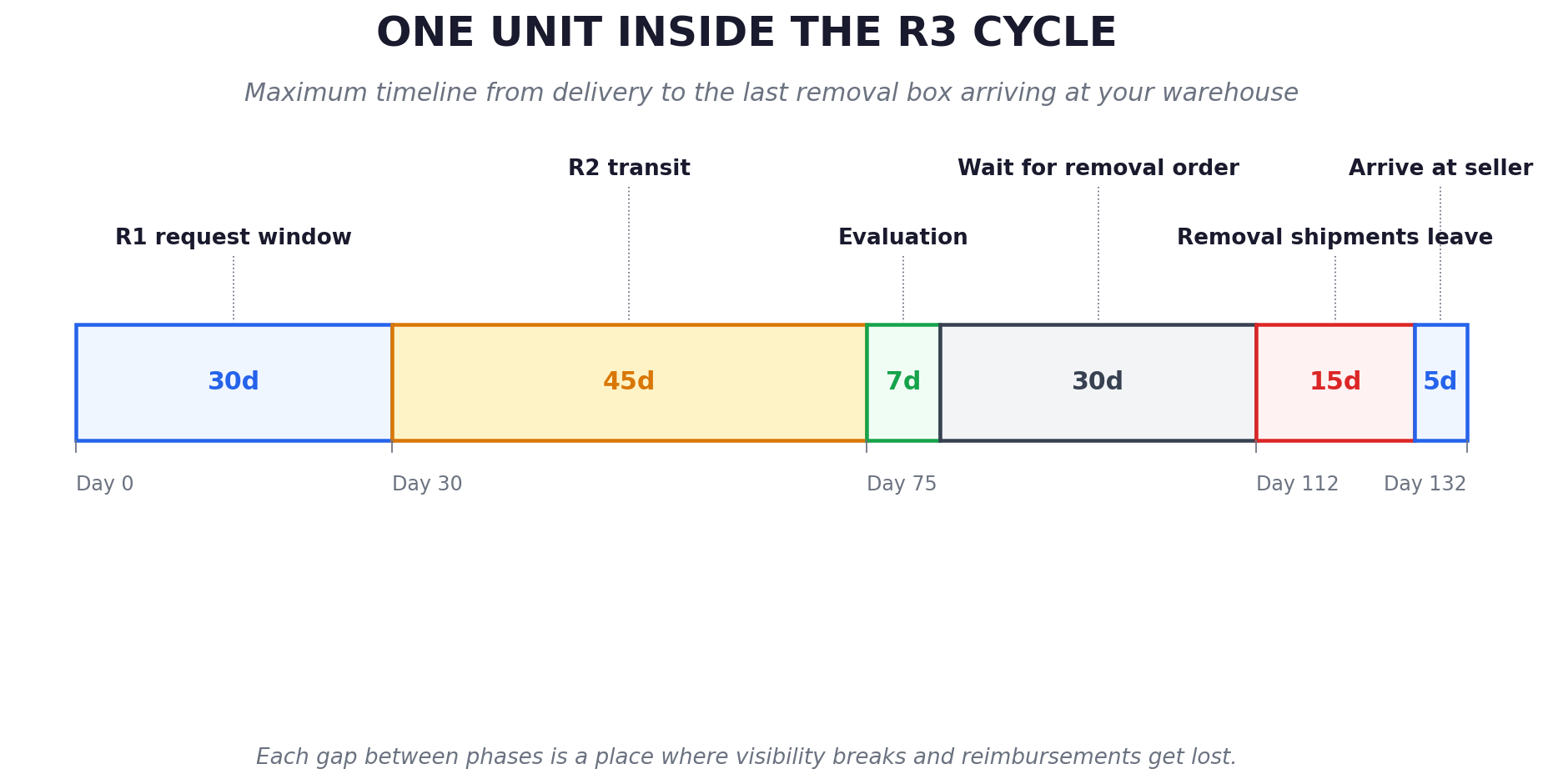
A single unit can spend a long time inside the R3 Cycle.
Add the windows:
- 30 days for the customer to request reimbursement
- 45 days or more to physically ship the unit back
- 7 days for Amazon to evaluate
- 30 days before a removal order is created
- 15 days for the removal shipments to leave the network
- 5 days for them to arrive at your warehouse.
A single unit can spend 2-4 months traveling between four locations before the cycle ends.
Months of confusion. Months during which a missed step compounds into a lost reimbursement.
Time is also the reason most operators lose visibility. You do not see the failure in real time. By the time the removal box arrives at your warehouse and you notice the missing units, the original window for that customer event may have already closed. The trail has cooled.
The R3 Cycle is not just 3 events. It is 3 events stretched across a long timeline, where each stage has its own clock and each clock has its own consequences.
🎯 From Brain Fog to Map
Why does any of this matter?
Because without a clear high-level picture, you are running left and right without context. Each unit problem looks like a new problem. Each Amazon ticket reads like a one-off complaint. You react. You chase fires. You ask the wrong questions, in the wrong order.
With the R3 Cycle in mind, the picture changes:
- You know exactly where each problem lives.
- You know which clock is running.
- You know which words to use.
- You stop reacting and start operating.
Vocabulary precedes control. That is the single most underrated truth in FBA operations.
The R3 Cycle is not a sales pitch. It is a mental model. Use it for a week and your support tickets get sharper. Use it for a month and your reimbursement recovery rate goes up. Use it as the default lens for every returned unit and the brain fog lifts for good.
Now you have the map. The next step is checking your own numbers against it. The free Eagle Eye Return Scanner audit runs your last 18 months of removal data through the R3 Cycle in about 5 minutes and shows you exactly where your money is leaking. → Run the free audit