Amazon's Unsellable Label: What FBA Sellers Get Wrong
🔍 What "Sellable" and "Unsellable" Actually Mean
A seller removes 200 units from Amazon. Amazon marked all of them Unsellable.
When the boxes arrive at his warehouse and he opens them one by one, 94 units are in perfect condition. Undamaged. Ready to ship.
Amazon was wrong about 47% of them.
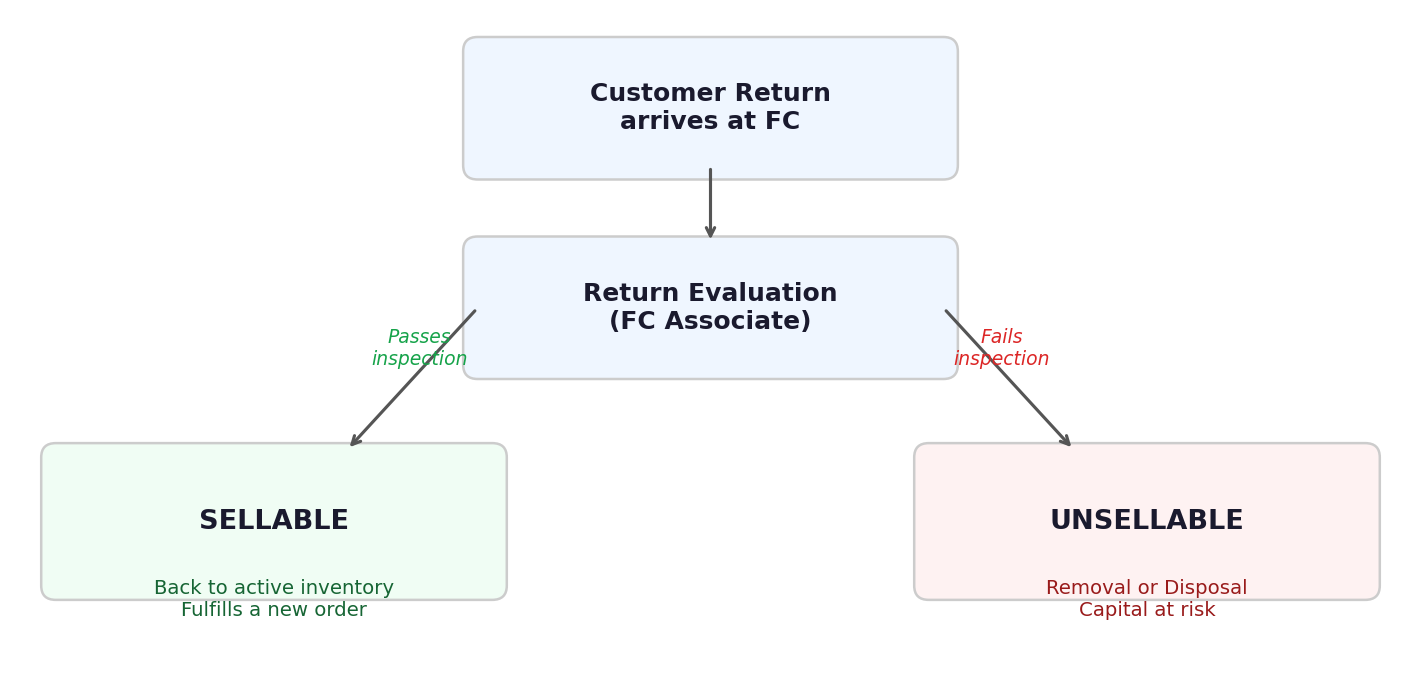
- Sellable. The unit can go back into active inventory and fill a new customer order.
- Unsellable. It cannot. For whatever reason, Amazon has decided this unit is not fit to ship again.
Those two piles determine your entire financial recovery path from that return. This is a pivotal point.
If a unit lands in the Sellable pile, it goes back to your inventory. You paid the Return Processing fee. But you don't lose the unit, you do not lose the money you invested in it.
The moment Amazon's employee stamps a unit Sellable or Unsellable is where money is either saved or lost. But the process that produces that decision is far less reliable than most sellers assume.
📦 The Amazon Dispositions You Need to Know
"Unsellable" is not one thing. It is a category that covers several distinct dispositions Amazon assigns to returned units.
The most common ones:
CUSTOMER_DAMAGED: the customer damaged the product before returning itDEFECTIVE: the unit is not functioning correctlyWAREHOUSE_DAMAGED: the unit was damaged inside an Amazon facilityCARRIER_DAMAGED: damaged in transit, inbound or outboundDISTRIBUTOR_DAMAGED: damaged before it reached AmazonEXPIRED: past its sell-by date
All of these collapse into a single status in your Seller Central account: Unsellable.
The distinction between them matters for reimbursement claims, specifically for determining whether Amazon owes you money for a unit damaged in their care versus one the customer damaged. But from the perspective of sellability, all of these units share the same fate: they are pulled from inventory and will not ship to a new buyer.
This article on FBA reimbursements covers the different claim types in detail if you want to understand what you can recover from each disposition.
🔬 How the Evaluation Actually Works
When a customer return arrives at the fulfillment center, it goes through a process Amazon calls return evaluation.
A physical employee picks up the unit. They inspect it. They make a call: Sellable or Unsellable.
That is the process. It sounds simple. It is not.
The variables involved are significant.
The person doing the evaluation changes. Not every associate at every fulfillment center is trained identically. One associate might classify a lightly scuffed box as Sellable. Another might classify the same box as Customer Damaged. Neither is technically wrong, given the loose guidelines they work with.
The equipment available at each FC varies. Some fulfillment centers have more sophisticated testing tools for electronics, for example. Others rely more heavily on visual inspection. Amazon announced x-ray inspection lately. The same unit can be evaluated using fundamentally different methods depending on where it lands.
The item itself introduces variation. A product returned in its original packaging is evaluated differently from one that arrives in an Amazon poly bag. A fragile item that survived the return intact gets different handling than one that rattles. Products with no visible damage but potential internal defects are especially prone to inconsistent grading.
Add these variables together and you get a process that is genuinely inconsistent, not by design, but by the nature of human judgment at scale, across hundreds of fulfillment centers, processed by tens of thousands of associates.
"All that is gold does not glitter." — J.R.R. Tolkien
From your perspective as a seller, this is almost entirely invisible. You do not know which FC received your return, who evaluated it, or what equipment they used. You see a disposition code in Seller Central. That is it.

💸 The Financial Consequence of Treating "Unsellable" as Final
Here is where the practical impact becomes clear.
When Amazon marks a unit Unsellable, the path most sellers take is one of two things: they leave it in Amazon's hands to dispose of, or they request a removal and send the units somewhere, often without a clear inspection plan.
Both paths can lose money. But the first one guarantees it.
Disposal means the unit is destroyed. Whatever you paid to source it, ship it, and prep it is gone. Whatever retail value it had is gone. Be smart, avoid this.
Now consider this number: from the sellers we work with who physically inspect their removal shipments, between 40% and 60% of units Amazon classified as Unsellable are, in fact, sellable.
That range varies a bit across categories. But it holds across order volumes and across sellers who have been doing it for years.
Think about what that means in practice. If you receive 100 units in a removal order, you can expect 50 of them to be in perfectly resalable condition. Amazon's process produced the wrong answer for nearly half of them.
If you choose removal and inspect, those same units can go back to Amazon as new FBA inventory. Capital that appeared to be lost is restored. You turn a disposal into a restock.
✅ What to Do About It
The fix is operational, not complicated.
- Step 1: Choose removal over disposal. Every time you have Unsellable units, request a removal to your warehouse. Do not authorize disposal.
- Step 2: Inspect every unit when it arrives. Open every box. One question per unit: would I send this to a customer? Yes, it is sellable. No, set it aside.
- Step 3: Send sellable units back to Amazon. Relabel and create a new FBA inbound shipment. They re-enter inventory. The capital is recovered.
- Step 4: Handle genuinely unsellable units separately. Document the damage. It can support a reimbursement claim if Amazon caused it. The rest you liquidate or discard on your own terms.
🔎 See Your Own Numbers
The real question is not whether this happens in general. It is how much it is already happening to your inventory right now.
This free audit shows you exactly the breakdown: how many of your Unsellable units are recoverable and what the capital value is. Here is what the output looks like for a real seller:
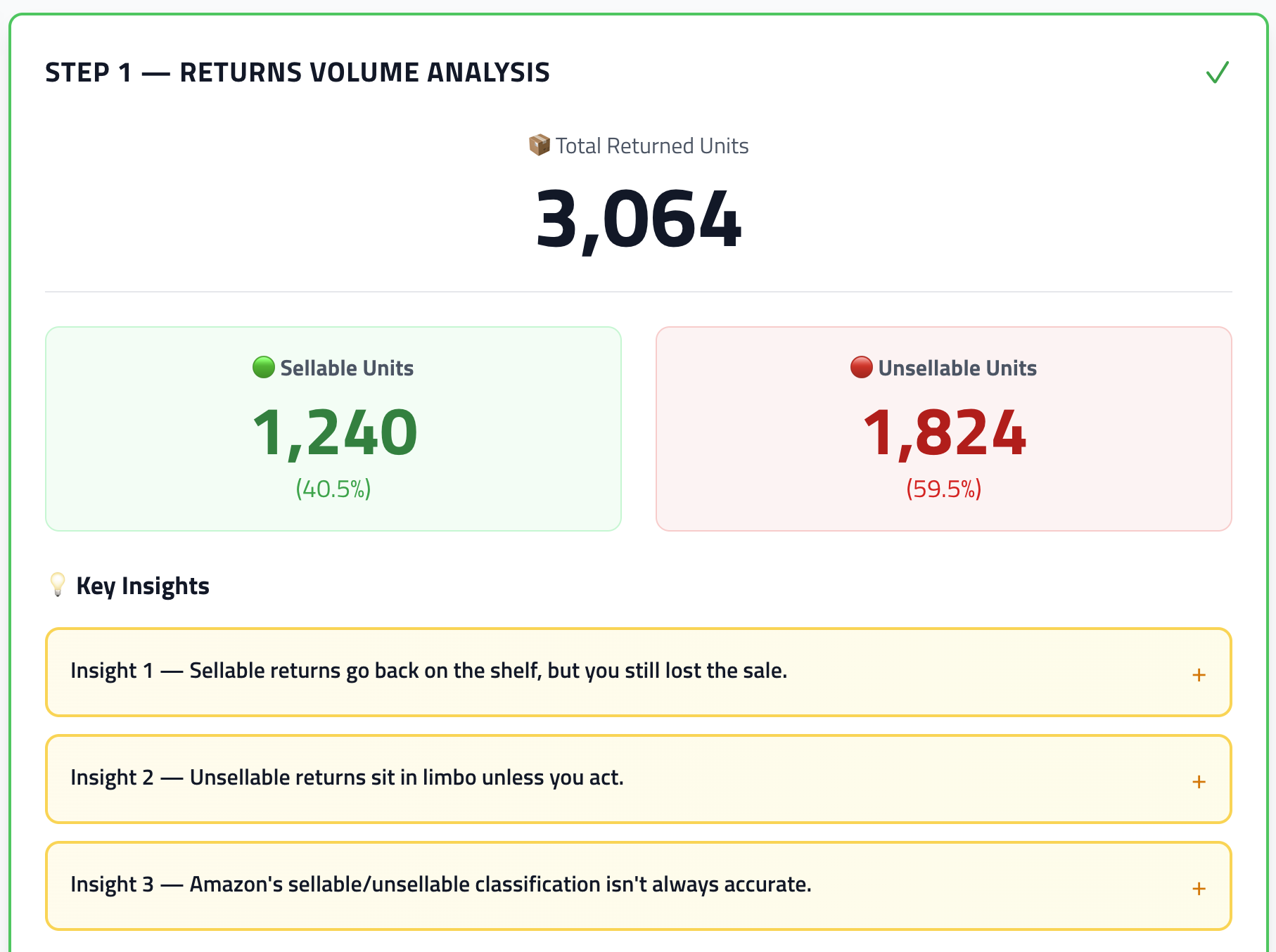
Want to see the same for your account? Run the free returns audit at eagle-eye.software/return-scanner/audit/returns. It takes under 5 minutes.