Amazon Sourcing Cost Update: 2 Rejections, €805 Back
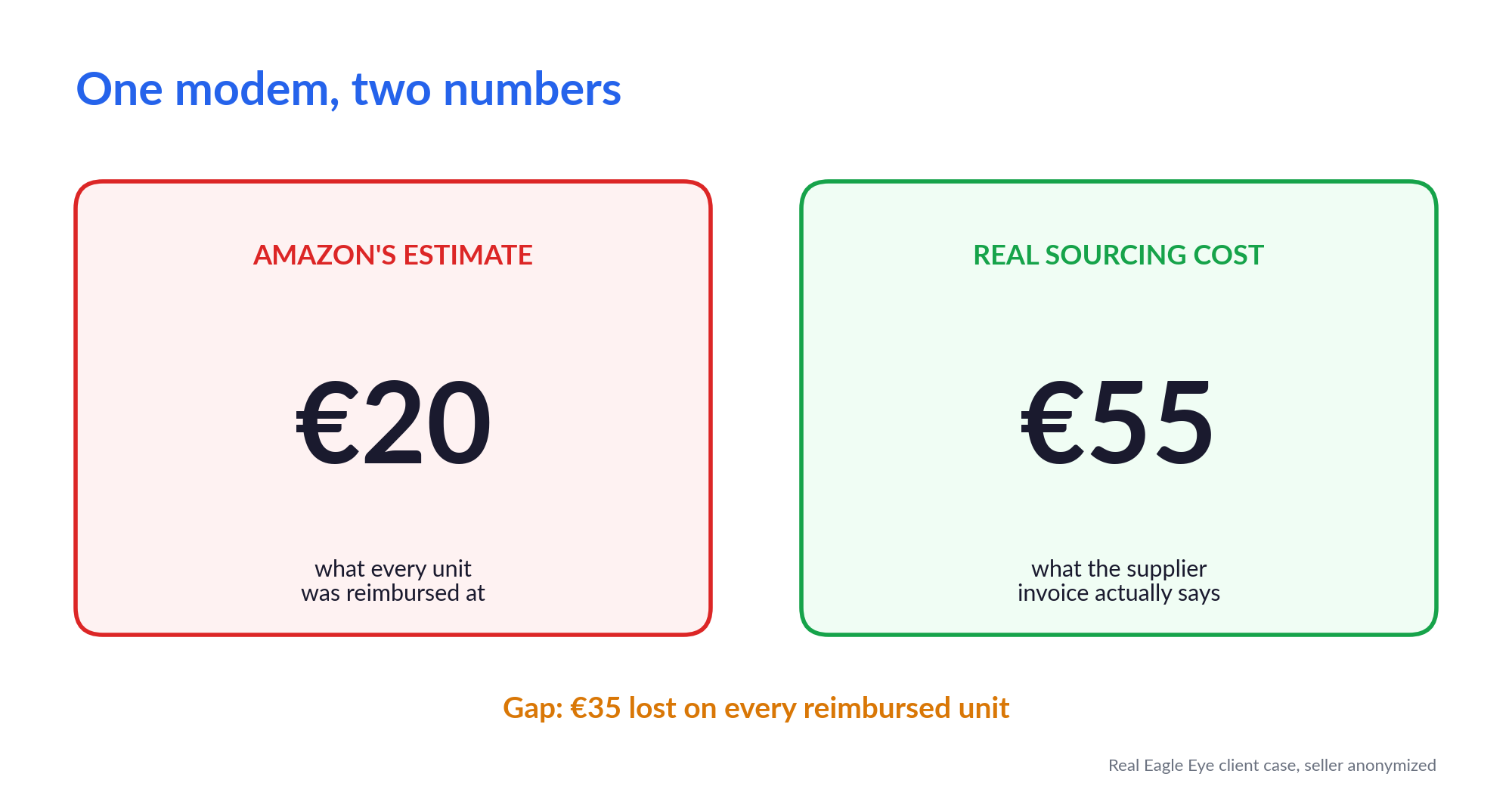
The modem cost €55. Amazon had it on file at €20.
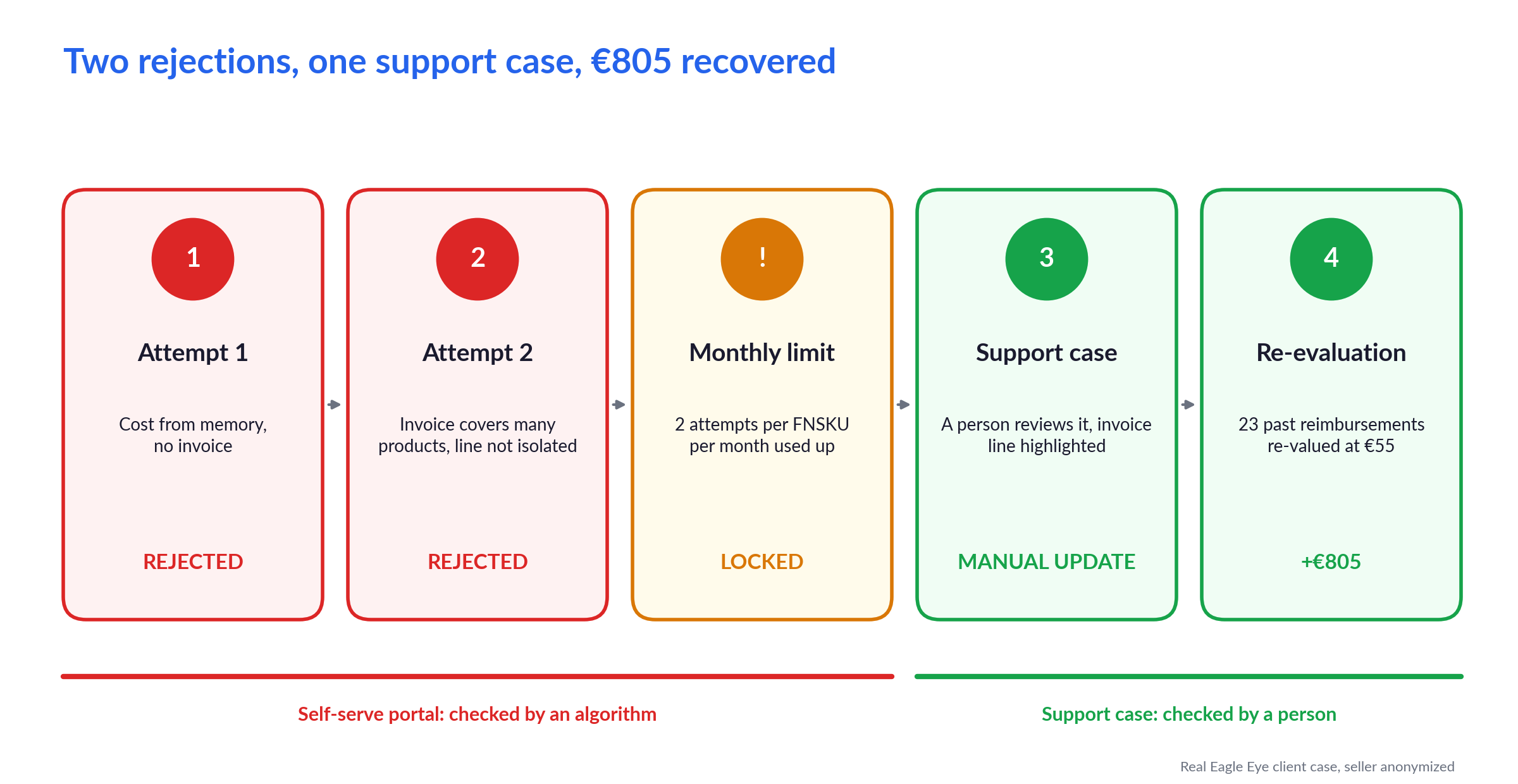
F., one of our clients, decided to fix that himself. Two attempts later, the portal had rejected him twice and he was locked out of that product.
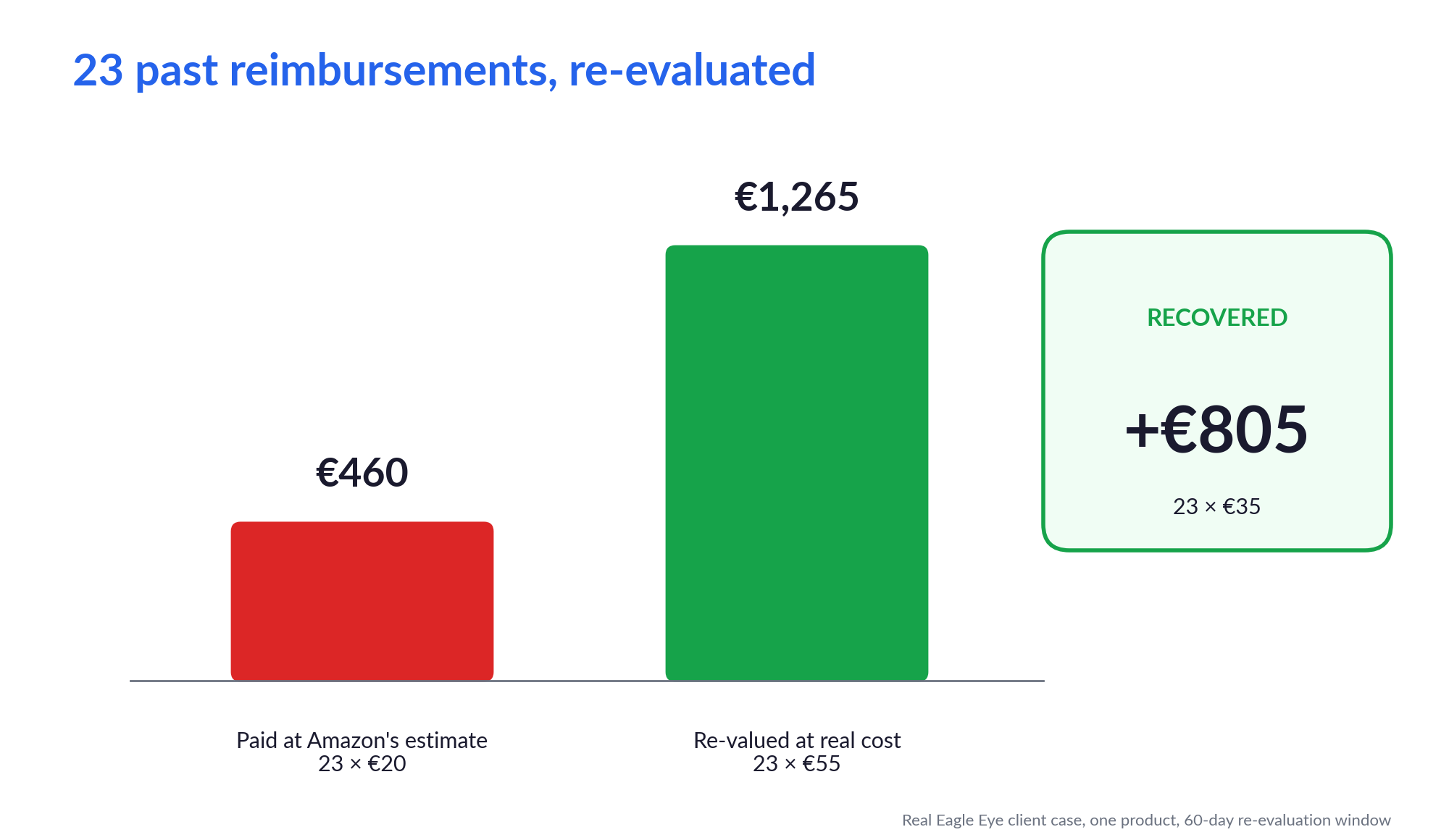
About two weeks after his first try, the right number was finally live in Seller Central. Then 23 reimbursements Amazon had already paid at €20 were re-valued at €55, for a total of €805 in additional reimbursements.
The tricky part is that the portal does not tell you this is even possible.
In April I wrote about why your FBA reimbursements are low and why you need to submit your sourcing costs. This is the sequel: what actually happens when you sit down and try.
🧾 Why a €55 Modem Was Worth €20 to Amazon
A quick recap if you missed the first article.
Since 31 March 2025, when Amazon loses or damages your inventory in its warehouses, it reimburses you based on what the product cost you to source, not what it sells for. If you have never told Amazon that cost, it fills the field in with its own estimate.
When we checked 97 seller accounts earlier this year, that estimate was sitting on 90.78% of SKUs. Most of the time, it is lower than what the seller actually pays.
F.'s modem was one of them. Amazon's estimate said €20. His supplier invoice said €55. So every time a unit got lost or damaged in an FBA warehouse, he got back €20 for something that cost him €55.
Lost and damaged units are only one of the reimbursement types you can claim, but they are the ones this number controls. Every single one of them gets paid at whatever sits in that field.
Have you looked at what Amazon has on file for your best-selling SKU?
F. hadn't. He didn't need to: the mismatch showed up in one of the dedicated reports our operations team sends him on WhatsApp.
Sourcing costs were new to him, so he got curious and decided to try the fix himself. Here is how it went.
❌ Attempt One: A Number From Memory
One rule first, because it shapes everything that follows: the portal gives you only two attempts per FNSKU per month. Use both and that product is locked until the next month.
F. opened the Manage Your Sourcing Cost page in Seller Central, typed in the cost he remembered paying, and submitted it. No invoice attached. He knew roughly what the modem cost him, so why dig through the paperwork?
Rejected.
Here is the thing to understand about the self-serve portal: nobody reads your submission. An algorithm checks it, comparing the cost you enter against a benchmark of its own.
Its rules and thresholds are not public. What you can see is that it only ever gives one of three answers:
- Accepted
- Denied
- Provide Invoice (proof requested before a final decision)
F. got Denied. Against Amazon's benchmark, the cost he entered was too high, and a rough number gave the algorithm no reason to ask for proof.
One attempt gone. One left.
❌ Attempt Two: The Right Invoice, the Wrong Shape
On the second try, F. did it properly. He found the supplier invoice and submitted the exact amount. This time the algorithm answered Provide Invoice, so he attached it.
Rejected again.
The invoice was real and the modem was on it. But so were many other products. It was a normal supplier invoice, the kind your accountant is perfectly happy with, covering a whole order.
For the portal, that is a problem. The algorithm needs to match one FNSKU to one unit price, and it could not isolate the line. A document that is correct for accounting can still be the wrong shape for Amazon.
And that was his last attempt. Both were gone, and the modem was locked at €20 until the next month, with no guarantee that a third try would go any differently.

This is where the DIY route usually ends. Not with a decision. With a shrug, and the quiet conclusion that it is not worth the hours.
🤝 The Route the Portal Does Not Show You
At that point F. passed it back to us. This was exactly the kind of fight he did not want to spend another month on.
We did not try the portal a third time. We opened a support case and asked for a manual update.
The difference matters. The portal is an algorithm following rules nobody can see. A support case puts a person on the other side, and a person can be walked through the documentation. So that is what we did. We explained the product, explained the cost, and sent the same supplier invoice with the modem's line clearly highlighted, so there was nothing left to interpret.
It was not instant. It takes time to persuade Seller Support that a manual update is the right call, and it took some back and forth before they confirmed it. Then a couple more days before the new cost actually appeared in Seller Central.
From F.'s first attempt to €55 showing in the account: about two weeks.
Portal or support case?
A support case is not the first thing to try. Here is how the two routes compare:
- Who decides: the portal is an algorithm. A support case is a person.
- What it needs: the portal needs a document it can match on its own. In a support case you can explain, and point to the exact line.
- Speed: the portal answers faster. A support case takes days of back and forth, and persistence.
- When to use it: start with the portal when you have a clean, single-product invoice. Switch to a support case after two denials, or when your situation does not fit the portal's boxes. Manufacturers submitting production costs run into this far more often than resellers.
⏳ The Part Nobody Tells You: Past Reimbursements Stay Wrong
The new cost was live. Job done?
Not quite. Updating your sourcing cost changes future reimbursements. It does nothing to the ones already paid. Every modem Amazon had reimbursed at €20 was still sitting in the account at €20.
In April I wrote that there is no retroactive correction. That was too absolute, and I want to correct it here. Nothing is corrected automatically. But once your sourcing cost is approved, Amazon lets you request a re-evaluation of a past reimbursement within 60 days of the original payment. Amazon's own moderators have confirmed it on the Seller Forums. The portal just does not advertise it.
So we went back through F.'s reimbursement history. Inside that 60-day window we found 23 reimbursement events on the modem, every one of them valued at €20. We asked Amazon to re-evaluate all of them.
All 23 came back at the updated €55.
- 23 events × €35 gap = €805
- On a single product
- Money F. would never have seen if nobody had asked
"Ask, and it shall be given you." – Matthew 7:7
There is a second lesson hidden in that window. The 60 days run from each original reimbursement, not from the day your new cost is approved. Every day spent on rejected attempts is a day your oldest reimbursements slide out of reach. Two weeks of back and forth is roughly a quarter of the window.
That is the real price of a sloppy first submission.
🎯 The Pro Move: Do Not Fix Your Whole Catalog
After a story like this, the instinct is to go and update every SKU you have. Please don't.
Each update is a small project: find the invoice, make sure it isolates the product, submit, wait, and maybe fight. Do that across a whole catalog and it becomes a big project that never ends.
You only need the SKUs where Amazon is paying you too little, right now. F.'s modem was exactly that: a €35 gap and 23 reimbursements in two months. A product that is €2 off and gets lost twice a year can wait.
That is how we handle it for our clients. Every month, our team sends a report that flags the few SKUs worth fixing, the same kind of report that caught F.'s modem. A catalog-wide project turns into a short monthly process.
Selective beats exhaustive. It is also what makes the job finishable.
And if you have been holding back because you do not want to hand Amazon your supplier invoices, you are not alone. It was one of the three reasons sellers gave for not acting back in April. A seller told me recently:
"I always avoided giving Amazon too much info, but now I am changing my mind."
✅ The First-Timer's Checklist
If you are about to submit a sourcing cost for the first time, here is everything F.'s case taught us, in order:
- Pick the right SKUs. Only the ones Amazon reimburses too low, and often. Skip the rest.
- Use the invoice, not your memory. Enter the exact cost from the document. A rough number can be denied before you even get the chance to show proof.
- Make the document single-purpose. One product, one unit price, easy to match to the FNSKU. A multi-product invoice is what sank F.'s second attempt.
- Treat your first attempt as your only one. You get two per FNSKU per month, and the 60-day clock does not wait for you.
- If the portal rejects you twice, open a support case. Ask for a manual update, walk them through the documents, highlight the exact line.
- Once the new cost is live, request a re-evaluation of every reimbursement on that SKU from the last 60 days. It will not happen by itself.
Step 6 is where the money is. Steps 2 to 4 are what keep the 60-day window from shrinking before you get there.
F. was not careless. He did what almost anyone does the first time: trust the number in his head, then trust a perfectly good invoice. The portal rejected both, and said nothing about the €805 waiting behind them.
Want the same safety net? Eagle Eye recovers FBA reimbursements across your whole account, and the service includes the monthly sourcing cost report that caught F.'s modem. You get the short list of SKUs worth fixing, and a team that knows how to get the money back before the 60-day window closes.